InnJoo Fire2 Plus LTE Flash File MT6735_5.1 Dead-Hang-Lcd Fix 100% Tested File

On this page, you will find the official link to download InnJoo Fire2 Plus LTE Stock Firmware ROM (flash file) on your Computer. The firmware comes in a zip package, which contains Flash File, Flash Tool, Driver and How-to Manual.

Firmware version: 
MT6735__InnJoo__Fire2_Plus_LTE__hct6735m_35gu_l1__5.1__Fire2_Plus_LTE-Android5.1-InnJoo-20160217-V1
Download the official Innjoo Fire 2 Plus LTE Stock Firmware (Flash File) 
Model Brand : InnJoo Fire2 Plus LTE
Device CPU:   MT6735
Rom Version : Android 5.1
Room Type?:  Customer Care File
The problem with this file will be solved on your mobile
 InnJoo Fire2 Plus LTE Problems missing file.
 InnJoo Fire2 Plus LTE Hang Logo Fix
 InnJoo Fire2 Plus LTE Quickly Flexible LCD.
 InnJoo Fire2 Plus LTE Ram’s slow performance.
 Finally your InnJoo Fire2 Plus LTE hang logo solve.
 InnJoo Fire2 Plus LTE Also Unwanted monkey / sexy virus.
 InnJoo Fire2 Plus LTE Finally unfortunately App has been stopped.
 When the InnJoo Fire2 Plus LTE shows Black and White LCD.
 As can be seen Automatically restart InnJoo Fire2 Plus LTE phone.
 Automatically install the application on InnJoo Fire2 Plus LTE phone.
 InnJoo Fire2 Plus LTE While unfortunately app has been stopped android.
 InnJoo Fire2 Plus LTE Frp Bypass Reset File.
 InnJoo Fire2 Plus LTE Fastboot Mode Fix fix.
 InnJoo Fire2 Plus LTE Dead Recovery Firmware,


InnJoo Fire2 Plus LTE MT6735_5.1 Flash File (Tested)

Read version: 
Reading Flash Content now ... 

xGPT : Normalize settings Ok!

Brand     : InnJoo
ProdName  : full_hct6735m_35gu_l1
ProdModel : Fire2 Plus LTE
Device    : hct6735m_35gu_l1
AndroidVer: 5.1
MTKxCPU   : MT6735
MTKxPRJ   : Fire2_Plus_LTE-Android5.1-InnJoo-20160217-V1

[Read Ok] : preloader_hct6735m_35gu_l1.bin
[Read Ok] : lk.bin
[Read Ok] : boot.img
[Read Ok] : recovery.img
[Read Ok] : logo.bin
[Read Ok] : secro.img
[Read Ok] : tz1.img
[Read Ok] : tz2.img
[Read Ok] : system.img
[Read Ok] : cache.img
[Read Ok] : userdata.img

[ScatCFG] : MT6735M / V1.1.2 / hct6735m_35gu_l1 / EMMC
Android Info saved
MAUI Meta DB saved
HWConfig Info saved
FW Size : 1485 MiB
Scatter saved to : E:\injo\MT6735__InnJoo__Fire2_Plus_LTE__hct6735m_35gu_l1__5.1__Fire2_Plus_LTE-Android5.1-InnJoo-20160217-V1\

All done!

Done!
Elapsed: 00:05:19
Reconnect Power/Cable!


Tag: 
InnJoo Fire2 Plus LTE, InnJoo Fire2 Plus LTE Flash File, InnJoo Fire2 Plus LTE Flash File Firmware, InnJoo Fire2 Plus LTE Firmware, InnJoo Fire2 Plus LTE Stock Rom, InnJoo Fire2 Plus LTE cpu, Download InnJoo Fire2 Plus LTE Stock Rom, InnJoo Fire2 Plus LTE Stock Firmware, InnJoo Fire2 Plus LTE boot file, InnJoo Fire2 Plus LTE frp bypass, InnJoo Fire2 Plus LTE da file .



Download Flash Tool & Driver :
How To Use - SP Flash Tool - SPD Upgrade Tool (Full Guide)
Download Latest ALL - MTK/SPD USB Drivers

innjoo Fire2 Air LTE Flash File 5.1 MT6735 Hang Logo & dead boot Fix 100% Tested File

On this page, you will find the official link to download innjoo Fire2 Air LTE Firmware ROM (flash file) on your Computer. The firmware comes in a zip package, which contains Flash File, Flash Tool, Driver and How-to Manual.

Firmware version: 
 MT6735__InnJoo__Fire2_Air_LTE__Fire2_Air_LTE__5.1__ALPS.L1.MP3.V2.95_
GR6735M.35U.RL.L1_P32
 
innjoo Fire2 Air LTE Flash File 5.1_MT6735 Dead-Hang Logo-Lcd Fix 100% Tested File

    Model Brand : innjoo Fire2 Air LTE
    Device CPU:   MT6735
    Rom Version : Android 5.1
    Room Type?:  Customer Care File

The problem with this file will be solved on your mobile
 innjoo Fire2 Air LTE Problems missing file.
 innjoo Fire2 Air LTE Hang Logo Fix
 innjoo Fire2 Air LTE Quickly Flexible LCD.
 innjoo Fire2 Air LTE Ram’s slow performance.
 Finally your innjoo Fire2 Air LTE hang logo solve.
 innjoo Fire2 Air LTE Also Unwanted monkey / sexy virus.
 innjoo Fire2 Air LTE Finally unfortunately App has been stopped.
 When the innjoo Fire2 Air LTE shows Black and White LCD.
 As can be seen Automatically restart innjoo Fire2 Air LTE phone.
 Automatically install the application on innjoo Fire2 Air LTE phone.
 innjoo Fire2 Air LTE While unfortunately app has been stopped android.
 innjoo Fire2 Air LTE Frp Bypass Reset File.
 innjoo Fire2 Air LTE Fastboot Mode Fix fix.
 innjoo Fire2 Air LTE Dead Recovery Firmware,


innjoo Fire2 Air LTE Flash File 5.1 MT6735 (Tested)

Read version: 
Reading Flash Content now ...

xGPT : Normalize settings Ok!

Brand     : InnJoo
ProdName  : Fire2 Air LTE
ProdModel : Fire2 Air LTE
Device    : Fire2 Air LTE
AndroidVer: 5.1
MTKxCPU   : MT6735
MTKxPRJ   : ALPS.L1.MP3.V2.95_GR6735M.35U.RL.L1_P32

[Read Ok] : preloader_a160.bin
[Read Ok] : lk.bin
[Read Ok] : boot.img
[Read Ok] : recovery.img
[Read Ok] : logo.bin
[Read Ok] : secro.img
[Read Ok] : tz1.img
[Read Ok] : tz2.img
[Read Ok] : system.img
[Read Ok] : cache.img
[Read Ok] : userdata.img

[ScatCFG] : MT6735M / V1.1.2 / a160 / EMMC
Android Info saved
MAUI Meta DB saved
HWConfig Info saved
FW Size : 2599 MiB
Scatter saved to : H:\innjoo\MT6735__InnJoo__Fire2_Air_LTE__Fire2_Air_LTE__5.1__ALPS.L1.MP3.V2.95_GR6735M.35U.RL.L1_P32\

All done!

Done!
Elapsed: 00:09:31
Reconnect Power/Cable!


Tag: 
innjoo Fire2 Air LTE, innjoo Fire2 Air LTE Flash File, innjoo Fire2 Air LTE Flash File Firmware, innjoo Fire2 Air LTE Firmware, innjoo Fire2 Air LTE Stock Rom, innjoo Fire2 Air LTE cpu, Download innjoo Fire2 Air LTE Stock Rom, innjoo Fire2 Air LTE Stock Firmware, innjoo Fire2 Air LTE boot file, innjoo Fire2 Air LTE frp bypass, innjoo Fire2 Air LTE da file .


Download Flash Tool & Driver :
How To Use - SP Flash Tool - SPD Upgrade Tool (Full Guide)
Download Latest ALL - MTK/SPD USB Drivers


Infinix X521 Flash File 6.0 MT6735 Hang Logo & dead boot Fix 1000% Tested File

On this page, you will find the official link to download Infinix_X521 Firmware ROM (flash file) on your Computer. The firmware comes in a zip package, which contains Flash File, Flash Tool, Driver and How-to Manual.

Firmware version: 
MT6735__Infinix__Infinix_X521__Infinix-X521-Pro__6.0__X521-J5088C1-M-161228V118


Model Brand : Infinix_X521
Device CPU: MT6735
Rom Version : Android 6.0
Room Type?: Customer Care File  
The problem with this file will be solved on your mobile
 Infinix_X521 Problems missing file.
 Infinix_X521 Hang Logo Fix
 Infinix_X521 Quickly Flexible LCD.
 Infinix_X521 Ram’s slow performance.
 Finally your Infinix_X521 hang logo solve.
 Infinix_X521 Also Unwanted monkey / sexy virus.
 Infinix_X521 Finally unfortunately App has been stopped.
 When the Infinix_X521 shows Black and White LCD.
 As can be seen Automatically restart Infinix_X521 phone.
 Automatically install the application on Infinix_X521 phone.
 Infinix_X521 While unfortunately app has been stopped android.
 Infinix_X521 Frp Bypass Reset File.
 Infinix_X521 Fastboot Mode Fix fix.
 Infinix_X521 Dead Recovery Firmware,


Infinix X521 Flash File 6.0_MT6735 Flash File (Tested)

Read version: 
Reading Flash Content now ...

xGPT : Normalize settings Ok!

Brand     : Infinix
ProdName  : Infinix-X521-C1
ProdModel : Infinix_X521
Device    : Infinix-X521-Pro
AndroidVer: 6.0
MTKxCPU   : MT6735
MTKxPRJ   : X521-J5088C1-M-161228V118

[Read Ok] : preloader_rlk6753_65u_m0.bin
[Read Ok] : lk.bin
[Read Ok] : boot.img
[Read Ok] : recovery.img
[Read Ok] : logo.bin
[Read Ok] : secro.img
[Read Ok] : tz1.img
[Read Ok] : tz2.img
[Read Ok] : system.img
[Read Ok] : cache.img
[Read Ok] : userdata.img

[ScatCFG] : MT6753 / V1.1.2 / rlk6753_65u_m0 / EMMC
Android Info saved
MAUI Meta DB saved
HWConfig Info saved
FW Size : 3649 MiB
Scatter saved to : E:\infinix\MT6735__Infinix__Infinix_X521__Infinix-X521-Pro__6.0__X521-J5088C1-M-161228V118\

All done!

Done!
Elapsed: 00:08:48
Reconnect Power/Cable!


Tag: 
Infinix_X521, Infinix_X521 Flash File, Infinix_X521 Flash File Firmware, Infinix_X521 Firmware, Infinix_X521 Stock Rom, Infinix_X521 cpu, Download Infinix_X521 Stock Rom, Infinix_X521 Stock Firmware, Infinix_X521 boot file, Infinix_X521 frp bypass, Infinix_X521 da file .


Download Flash Tool & Driver :
How To Use - SP Flash Tool - SPD Upgrade Tool (Full Guide)
Download Latest ALL - MTK/SPD USB Drivers

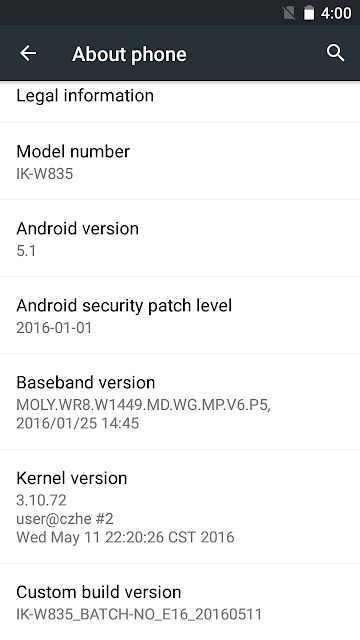
Ikon IK-W835 Flash File 5.1 MT6580 Hang Logo & dead boot Fix 1000% Tested File

On this page, you will find the official link to download Ikon IK-W835 Firmware (flash file) on your Computer. The firmware comes in a zip package, which contains Flash File, Flash Tool, Driver and How-to Manual.
Firmware version:
MT6580__IK-W835__IK-W835__w818_648_aw_hhq_ikon_nocam__5.1__w818_648_aw_hhq_ikon_nocam_v05

Ikon IK-W835 Firmware (Stock ROM). Download Ikon IK-W835 Stock Firmware ROM (Flash File) Which Contains Ikon IK-W835 Firmware
Model Brand : Ikon IK-W835
Device CPU: MT6580
Rom Version : Android 5.1
Room Type?: Customer Care File
The problem with this file will be solved on your mobile
 Ikon IK-W835 Problems missing file.
 Ikon IK-W835 Hang Logo Fix
 Ikon IK-W835 Quickly Flexible LCD.
 Ikon IK-W835 Ram’s slow performance.
 Finally your Ikon IK-W835 hang logo solve.
 Ikon IK-W835 Also Unwanted monkey / sexy virus.
 Ikon IK-W835 Finally unfortunately App has been stopped.
 When the Ikon IK-W835 shows Black and White LCD.
 As can be seen Automatically restart Ikon IK-W835 phone.
 Automatically install the application on Ikon IK-W835 phone.
 Ikon IK-W835 While unfortunately app has been stopped android.
 Ikon IK-W835 Frp Bypass Reset File.
 Ikon IK-W835 Fastboot Mode Fix fix.
 Ikon IK-W835 Dead Recovery Firmware,


Ikon IK-W835  Flash File 5.1_MT6580 Firmware (Tested)

Read version: 
Reading Flash Content now ...

xGPT : Normalize settings Ok!

Brand     : IK-W835
ProdName  : full_w818_648_aw_hhq_ikon_nocam
ProdModel : IK-W835
Device    : w818_648_aw_hhq_ikon_nocam
AndroidVer: 5.1
MTKxCPU   : MT6580
MTKxPRJ   : w818_648_aw_hhq_ikon_nocam_v05

[Read Ok] : preloader_w818_648_aw_hhq_ikon_nocam.bin
[Read Ok] : lk.bin
[Read Ok] : boot.img
[Read Ok] : recovery.img
[Read Ok] : logo.bin
[Read Ok] : secro.img
[Read Ok] : system.img
[Read Ok] : cache.img
[Read Ok] : userdata.img

[ScatCFG] : MT6580 / V1.1.2 / w818_648_aw_hhq_ikon_nocam / EMMC
Android Info saved
MAUI Meta DB saved
HWConfig Info saved
FW Size : 2123 MiB
Scatter saved to : E:\MT6580__IK-W835__IK-W835__w818_648_aw_hhq_ikon_nocam__5.1__w818_648_aw_hhq_ikon_nocam_v05\

All done!

Done!
Elapsed: 00:09:07
Reconnect Power/Cable!


Tag: 
Ikon IK-W835, Ikon IK-W835 Flash File, Ikon IK-W835 Flash File Firmware, Ikon IK-W835 Firmware, Ikon IK-W835 Stock Rom, Ikon IK-W835 cpu, Download Ikon IK-W835 Stock Rom, Ikon IK-W835 Stock Firmware, Ikon IK-W835 boot file, Ikon IK-W835 frp bypass, Ikon IK-W835 da file .


Download Flash Tool & Driver :
How To Use - SP Flash Tool - SPD Upgrade Tool (Full Guide)
Download Latest ALL - MTK/SPD USB Drivers

Ikon IK-542 Flash File SP7731 5.1 Hang Logo & dead boot Fix 1000% Tested File

On this page, you will find the official link to download Ikon IK-542 Firmware ROM (flash file) on your Computer. The firmware comes in a zip package, which contains Flash File, Flash Tool, Driver and How-to Manual.

Firmware version: 
C390_QXT_0M1_c390_qxt_0m1_5.1_LMY47D_release-keys_IK-542
Ikon IK-542 Flash File SP7731 5.1 Dead-Hang Logo-Lcd Fix 100% Tested File
 
 
Model Brand : Ikon IK-542
Rom Version : Android 5.1
            Room Type?:  Customer Care File
The problem with this file will be solved on your mobile
 Ikon IK-542 Problems missing file.
 Ikon IK-542 Hang Logo Fix
 Ikon IK-542 Quickly Flexible LCD.
 Ikon IK-542 Ram’s slow performance.
 Finally your Ikon IK-542 hang logo solve.
 Ikon IK-542 Also Unwanted monkey / sexy virus.
 Ikon IK-542 Finally unfortunately App has been stopped.
 When the Ikon IK-542 shows Black and White LCD.
 As can be seen Automatically restart Ikon IK-542 phone.
 Automatically install the application on Ikon IK-542 phone.
 Ikon IK-542 While unfortunately app has been stopped android.
 Ikon IK-542 Frp Bypass Reset File.
 Ikon IK-542 Fastboot Mode Fix fix.
 Ikon IK-542 Dead Recovery Firmware,


Ikon IK-542 Flash File SP7731 5.1 Flash File (Tested)

Read version: 
- > Wait phone connected ...

Phone found! [ 21 ]
Port Opened
Sync...
InitBoot Done [ 0x81 ] , Ver : SPRD3
Sync...
Sending FDL
[Info] : If SW freeze here more, than 15 seconds - remove cable
FDL Ready!
Boot Ver : SC7731 Crev eMMC Loader v2.0    
Sending FLASH FDL
FLASH FDL Ready!
Boot Ok!

Model Name  : c390_qxt_0m1
Model Brand : IK-542
Model Device: c390_qxt_0m1
AndrVersion : 5.1
BaseBand CPU: C390_QXT_0M1
Project Ver : LMY47D release-keys
Model Ext   : IK-542

[Read Mode] : HSUSB : 0x3000

[FW_READER] : Reading Firmware Now ...

[Read Ok] : u-boot-spl-16k.bin
[Read Ok] : u-boot.bin
[Read Ok] : prodnv.img
[Read Ok] : sc7731g_CP0_modem.bin
[Read Ok] : DSP_DM_Gx.bin
[Read Ok] : nvitem_w.bin
[Read Ok] : sc8830g_modem_CP2_Trunk_W15.49.3_Release.bin
[Read Ok] : nvitem_wcn.bin
[Read Ok] : logo_480x800.bin
[Read Ok] : fblogo_480x800.bin
[Read Ok] : boot.img
[Read Ok] : system.img
[Read Ok] : oem.img
[Read Ok] : sysinfo.img
[Build Ok] : cache.img
[Read Ok] : recovery.img
[Build Ok] : userdata.img

AndroidInfo created
Firmware Size : 1279 MiB
Saved to : E:\C390_QXT_0M1_c390_qxt_0m1_5.1_LMY47D_release-keys_IK-542\
Done!

Elapsed: 00:07:10

Reconnect Power/Cable!


Tag: 
Ikon IK-542, Ikon IK-542 Flash File, Ikon IK-542 Flash File Firmware, Ikon IK-542 Firmware, Ikon IK-542 Stock Rom, Ikon IK-542 cpu, Download Ikon IK-542 Stock Rom, Ikon IK-542 Stock Firmware, Ikon IK-542 boot file, Ikon IK-542 frp bypass, Ikon IK-542 da file .


Download Flash Tool & Driver :
How To Use - SP Flash Tool - SPD Upgrade Tool (Full Guide)
Download Latest ALL - MTK/SPD USB Drivers


I-life ITELL K3400SL Flash File 6.0 Hang Logo & dead boot Fix 100% Tested File

On this page, you will find the official link to download I-life ITELL K3400SL Firmware (flash file) on your Computer. The firmware comes in a zip package, which contains Flash File, Flash Tool, Driver and How-to Manual.

Firmware version: 
SP7731GEA_HDR_K3400SL_6.0_I-life-ITELL_K3400SL_NST20171021_ITELL_K3400SL
I-LIFE ITELL K3400SL FLASH FILE SP7731 6.0 PAC FILE 100% TESTED
Download i-Life ITELL K3400SL Firmware Flash File

Download iLife Itell K3400SL GN file,iLife Itell K3400SL GN flash file,iLife Itell K3400SL
Model Brand : I-life ITELL K3400SL
Device CPU:   sp7731
Rom Version : Android 6.0
Room Type?:  Customer Care File
The problem with this file will be solved on your m obile
 I-life ITELL K3400SL Problems missing file.
 I-life ITELL K3400SL Hang Logo Fix
 I-life ITELL K3400SL Quickly Flexible LCD.
 I-life ITELL K3400SL Ram’s slow performance.
 Finally your I-life ITELL K3400SL hang logo solve.
 I-life ITELL K3400SL Also Unwanted monkey / sexy virus.
 I-life ITELL K3400SL Finally unfortunately App has been stopped.
 When the I-life ITELL K3400SL shows Black and White LCD.
 As can be seen Automatically restart I-life ITELL K3400SL phone.
 Automatically install the application on I-life ITELL K3400SL phone.
 I-life ITELL K3400SL While unfortunately app has been stopped android.
 I-life ITELL K3400SL Frp Bypass Reset File.
 I-life ITELL K3400SL Fastboot Mode Fix fix.
 I-life ITELL K3400SL Dead Recovery Firmware,


I-life ITELL K3400SL Flash File 6.0 Rom (Tested)

Read version: 
- > Wait phone connected ...

Phone found! [ 3 ]
Port Opened
Sync...
InitBoot Done [ 0x81 ] , Ver : SPRD3
Sync...
Sending FDL
[Info] : If SW freeze here more, than 15 seconds - remove cable
FDL Ready!
Boot Ver : SC773x Android 5.x eMMC v1.0 Inf
Sending FLASH FDL
FLASH FDL Ready!
Boot Ok!

Model Name  : K3400SL
Model Brand : i-life
Model Device: K3400SL
AndrVersion : 6.0
BaseBand CPU: SP7731GEA_HDR
Project Ver : I-life-ITELL_K3400SL_NST20171021
Model Ext   : ITELL K3400SL

[Read Mode] : HSUSB : 0x3000

[FW_READER] : Reading Firmware Now ...

[Read Ok] : u-boot-spl-16k.bin
[Read Ok] : u-boot.bin
[Read Ok] : prodnv.img
[Read Ok] : sc7731g_CP0_modem.bin
[Read Ok] : DSP_DM_Gx.bin
[Read Ok] : nvitem_w.bin
[Read Ok] : sc8830g_modem_CP2_WCN_14D_W16.26.3_Release.bin
[Read Ok] : nvitem_wcn.bin
[Read Ok] : logo_600x1024.bin
[Read Ok] : fblogo_600x1024.bin
[Read Ok] : boot.img
[Read Ok] : system.img
[Read Ok] : sysinfo.img
[Build Ok] : cache.img
[Read Ok] : recovery.img
[Build Ok] : userdata.img

AndroidInfo created
Firmware Size : 3117 MiB
Saved to : M:\SP7731GEA_HDR_K3400SL_6.0_I-life-ITELL_K3400SL_NST20171021_ITELL_K3400SL\
Done!

Elapsed: 00:41:10

Reconnect Power/Cable!


Tag: 
I-life ITELL K3400SL, I-life ITELL K3400SL Flash File, I-life ITELL K3400SL Flash File Firmware, I-life ITELL K3400SL Firmware, I-life ITELL K3400SL Stock Rom, I-life ITELL K3400SL cpu, Download I-life ITELL K3400SL Stock Rom, I-life ITELL K3400SL Stock Firmware, I-life ITELL K3400SL boot file, I-life ITELL K3400SL frp bypass, I-life ITELL K3400SL da file .


Download Flash Tool & Driver :
How To Use - SP Flash Tool - SPD Upgrade Tool (Full Guide)
Download Latest ALL - MTK/SPD USB Drivers


Samsung SM-J710F Clone Flash File Dead-Hang Logo-Lcd Fix 100% Tested File

On this page, you will find the official link to download Samsung SM-J710F Clone Stock Firmware ROM (flash file) on your Computer. The firmware comes in a zip package, which contains Flash File, Flash Tool, Driver and How-to Manual.

Firmware version: 
MT6572__samsung__SM-G530F__SM-G530F__4.4.4__ALPS.JB3.MP.V1

Samsung Galaxy SM-J710F (clone) Stock Firmware (Flash File)
 
Model Brand : Samsung SM-J710F Clone
Device CPU:   MT6572
Rom Version : Android 4.4.4
Room Type?:  Customer Care File
The problem with this file will be solved on your mobile
 Samsung SM-J710F Clone Problems missing file.
 Samsung SM-J710F Clone Hang Logo Fix
 Samsung SM-J710F Clone Quickly Flexible LCD.
 Samsung SM-J710F Clone Ram’s slow performance.
 Finally your Samsung SM-J710F Clone hang logo solve.
 Samsung SM-J710F Clone Also Unwanted monkey / sexy virus.
 Samsung SM-J710F Clone Finally unfortunately App has been stopped.
 When the Samsung SM-J710F Clone shows Black and White LCD.
 As can be seen Automatically restart Samsung SM-J710F Clone phone.
 Automatically install the application on Samsung SM-J710F Clone phone.
 Samsung SM-J710F Clone While unfortunately app has been stopped android.
 Samsung SM-J710F Clone Frp Bypass Reset File.
 Samsung SM-J710F Clone Fastboot Mode Fix fix.
 Samsung SM-J710F Clone Dead Recovery Firmware,


Samsung SM-J710F Clone_4.4.4_MT6572 Flash File (Tested)

Read version: 
Reading Flash Content now ... 
USBDL : Init HSUSB Ok!

Brand     : samsung
ProdName  : SM-G530F
ProdModel : SM-G530F
Device    : SM-G530F
AndroidVer: 4.4.4
MTKxCPU   : MT6572
MTKxPRJ   : ALPS.JB3.MP.V1

[Read Ok] : preloader_mbk72_wet_jb3.bin
[Read Ok] : MBR
[Read Ok] : EBR1
[Read Ok] : lk.bin
[Read Ok] : boot.img
[Read Ok] : recovery.img
[Read Ok] : secro.img
[Read Ok] : logo.bin
[Read Ok] : system.img
[Read Ok] : cache.img
[Read Ok] : userdata.img

[ScatCFG] : MT6572 / V1.1.1 / mbk72_wet_jb3 / EMMC
Android Info saved
HWConfig Info saved
FW Size : 673 MiB
Scatter saved to : E:\MT6572__samsung__SM-G530F__SM-G530F__4.4.4__ALPS.JB3.MP.V1\

All done!


Tag: 
Samsung SM-J710F Clone, Samsung SM-J710F Clone Flash File, Samsung SM-J710F Clone Flash File Firmware, Samsung SM-J710F Clone Firmware, Samsung SM-J710F Clone Stock Rom, Samsung SM-J710F Clone cpu, Download Samsung SM-J710F Clone Stock Rom, Samsung SM-J710F Clone Stock Firmware, Samsung SM-J710F Clone boot file, Samsung SM-J710F Clone frp bypass, Samsung SM-J710F Clone da file .


Download Flash Tool & Driver :
How To Use - SP Flash Tool - SPD Upgrade Tool (Full Guide)
Download Latest ALL - MTK/SPD USB Drivers