Symphony Xplorer P6 Pro 3GB RAM 10000000% ok Test File

Symphony Xplorer P6 Pro 3GB RAM 10000000% ok Test File

P6 PRO_3GB RAM


https://www.4shared.com/rar/Yj9Z1jHzca/P6_PRO_3GB_RAM_100_Test_File.html


Winmax Model- Tiger x4 Flash 10000000% ok Test File

Winmax Model- Tiger x4 Flash 10000000% ok Test File


 Winmax Model- Tiger x4

 
https://www.4shared.com/rar/bSU92VS5ei/Winmax_Model-_Tiger_x4_Flash_1.html

Lava Iris 702 Flash File (Firmware) MT6580 6.0 1000000% Tested File

Lava Iris 702 Flash File (Firmware) MT6580 6.0 1000000% Tested File
 Lava Iris 702 Ver : H002_INT/S110

Brand : Lava
ProdName : iris702
ProdModel : iris702
Device : iris702
AndroidVer: 6.0
MTKxCPU : MT6580
MTKxPRJ : alps-mp-m0.mp1-V2.34_lava6580.weg.m
[Read Ok] : preloader_lava6580_sp462.bin
[Read Ok] : lk.bin
[Read Ok] : boot.img
[Read Ok] : recovery.img
[Read Ok] : logo.bin
[Read Ok] : secro.img
[Read Ok] : system.img
[Read Ok] : cache.img
[Read Ok] : userdata.img
[ScatCFG] : MT6580 / V1.1.2 / lava6580_sp462 / EMMC
Android Info saved
MAUI Meta DB saved
HWConfig Info saved
FW Size : 1970 MiB
Scatter saved to : C:\Users\jamuna telecom\Desktop\MT6580__Lava__iris702__iris702__6.0__alps-mp-m0.mp1-V2.34_lava6580.weg.m\
https://www.4shared.com/rar/IpnoNMiMei/Lava_Iris_702_frimware_100_ok_.html

SYMPHONY ROAR E79 (E79_HW4_V12) FLASH FILE DEATH OR LCD FIX 100000% OK

SYMPHONY ROAR E79  (E79_HW4_V12) 
FLASH FILE DEATH OR LCD FIX 100000% OK
 SYMPHONY ROAR E79  (E79_HW4_V12) FLASH FILE DEATH OR LCD FIX 100% OK
E79_HW4_V12
100% TESTED
NO LOGO & HANG PROBLEM  OLL IN ALL SOLVED THIS FILE

THIS FILE DADE BOOT RECOVARE

DADE OR LCD LOGO PROBLEM FIXID THIS FILE

https://www.4shared.com/rar/HTLRzX6vca/E79_HW4_V12_MT6572_442_UP40_10.html

Brand     : Symphony

ProdName  : E79

ProdModel : E79

Device    : E79

AndroidVer: 4.4.2

MTKxCPU   : MT6572

MTKxPRJ   : UP40


[Read Ok] : preloader_up40_h405_sy_e79.bin

[Read Ok] : MBR

[Read Ok] : EBR1

[Read Ok] : lk.bin

[Read Ok] : boot.img

[Read Ok] : recovery.img

[Read Ok] : secro.img

[Read Ok] : logo.bin

[Read Ok] : system.img

[Read Ok] : cache.img

[Read Ok] : userdata.img


[ScatCFG] : MT6572 / V1.1.1 / up40_h405_sy_e79 / EMMC

Android Info saved

MAUI Meta DB saved

HWConfig Info saved

FW Size : 892 MiB

Scatter saved to : C:\Users\\Desktop\JAMUNA TELECOM\MT6572__Symphony__E79__E79__4.4.2__UP40\


All done!


Symphony V49 Flash File V49_XXX_V7 10000000% OK Tested File (After Flash Hang on logo,LCD,camera Problem Solved File)

Symphony V49 Flash File V49_XXX_V7 10000000% OK Tested File (After Flash Hang on logo,LCD,camera Problem Solved File)

V49_XXX_V7

https://www.4shared.com/rar/K4gLtZvZca/V49_XXX_V7_Low_saand_by_time--.html


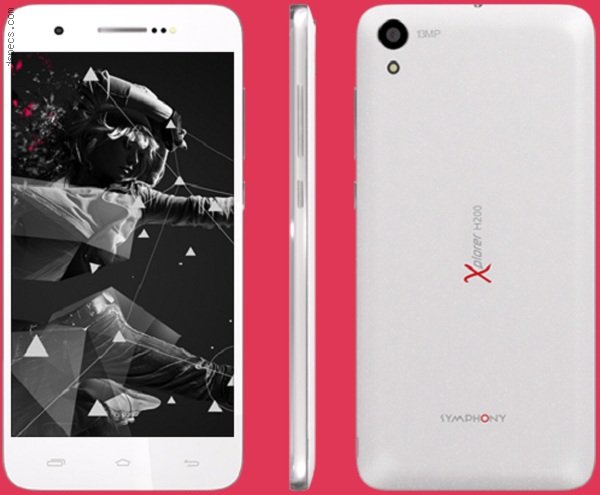
Symphony-H200-All Version-flash-file-firmware-Without-Password-1000000%-Tested-Free-Download

Symphony-H200-All Version-flash-file-firmware-Without-Password-1000000%-Tested-Free-Download


                                             Android 4.4.2 Kitk                                                       

1.3 GHz Quad Core

MT6582

https://drive.google.com/uc?id=0BzMDj7ugTrP1SFZnamdzWGZ4cG8


Lava Iris 821 Official Firmware 100000000% ok Test File

Lava Iris 821 Official Firmware 100000000% ok Test File

 
https://www.4shared.com/rar/-7EDw9Awce/Lava_Iris_821_Official_Firmwar.html

Symphony V75 Official Firmware flash file 10000000% tested

Symphony V75 Official Firmware flash file 10000000% tested 

Symphony V75_V6.0_MRA58K__V20 

Symphony V75_V6.0_V20


Monkey Virus Problem,Pattern Lock Problem,Privacy Lock Problem Solution,
Privacy Protection,Data Auto Open,
Auto Application download,
Hang On Logo Problem Solve Firmware Write Restart Problem Solve In Firmware

Update
 
Symphony V75 FlashFile Official Firmware 100% Tested Flash File 
Symphony V75 FlashFileFlash file Download link
Symphony V75 FlashFile100% Working Tested
This Flash File Death Phone, Hang Logo, LCD Blank,. 

Symphony V75_V6.0_V20

https://www.4shared.com/rar/xqtAdptOei/Symphony_V75_V60_MRA58K__V20.html


Install ROM:
[  Mobile Flash Video Tutorial - SP Tools / SPD ]

1). Turn off the smartphone. Cable is not connected to the computer.
2). Remove the battery and insert it again
3). Connect your phone to a computer cable. The operating system detects a new device
4). Disconnect the cable from the computer.
5). Run SPMultiPortFlashDownloadProject.exe
6). Choose File> Open File Agent download and specify the file MTK_AllInOneDA.bin (it is in the folder SP_MDT).
7). Click Scatter File and select the _Android_scatter.txt file (it's in the folder with the rom).
8). Click "Start all".
9). Connect your phone to a computer cable. The program should see and blink. If the phone is not detected, then unplug it from the computer,
 remove and insert the battery (if the battery is removable) and reconnect it to the computer.
10). After (OK) click Stop and disable any phone.
11). Completed.