Smile Q5 BA MT6572 Flash File 6.0 Hang Logo & dead boot Fix 1000% Tested File

On this page, you will find the official link to download Smile Q5 BA Stock Firmware ROM (flash file) on your Computer. The firmware comes in a zip package, which contains Flash File, Flash Tool, Driver and How-to Manual.

Firmware version: 
MT6572__SMILE__Q5__Q5__6.0__ALPS.KK1.MP7.V1Smile Q5 BA MT6572 Flash File
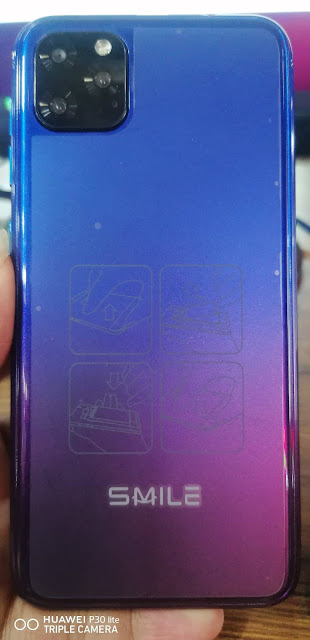
Smile Q5 ( BA Version ) Stock Firmware ROM ( Flash File ) Download For Your Smile Q5 ( BA Version )

Smile Q5 Firmware Rom (Flash File)

Model Brand : Smile Q5 BA
Device CPU:   MT6572
Rom Version : Android 6.0
Room Type?:  Customer Care File

The problem with this file will be solved on your mobile
 Smile Q5 BA Problems missing file.
 Smile Q5 BA Hang Logo Fix
 Smile Q5 BA Quickly Flexible LCD.
 Smile Q5 BA Ram’s slow performance.
 Finally your Smile Q5 BA hang logo solve.
 Smile Q5 BA Also Unwanted monkey / sexy virus.
 Smile Q5 BA Finally unfortunately App has been stopped.
 When the Smile Q5 BA shows Black and White LCD.
 As can be seen Automatically restart Smile Q5 BA phone.
 Automatically install the application on Smile Q5 BA phone.
 Smile Q5 BA While unfortunately app has been stopped android.
 Smile Q5 BA Frp Bypass Reset File.
 Smile Q5 BA Fastboot Mode Fix fix.
 Smile Q5 BA Dead Recovery Firmware,


Smile Q5 BA MT6572 Flash File 6.0 Flash File Firmware Rom (Tested)

Read version: 
Wait for phone...
Phone found! [ 42 ]
Sync...
Inital Boot Ok!
BB_CPU_PID : 6572
BB_CPU_NME : [MediaTek] MT6572_S00
BB_CPU_EXT : 0xCA01 , 0x8A00 , 0x0000
Processing BROM stage
Settings for BROM configured!
SecCfgVal : 0x00000000
BromVer   : 0x00FF
BLVersion : 0x0001
PreLoader : Active [ Boot with PL ]
BootLdrSS : NORMAL with PRELOADER
Processing DA stage
DA Select done, will use MTK_AllInOne_DA_v5.1624.16.07
Sending and initialize DA ...
Running DA ver.4.2 on BBID : 0x88
NAND Flash : NOT INSTALLED
eMMC Flash : 7001004545344541340127D92A335401
Initialize Memory ... 
DRAM already initialized by Preloader
DAgent sent , init HW now
eMMC FlashIC initialized
[eMMC] : FLASH_VEN : 0x70 , OEM : 0100
[eMMC] : FLASH_INF : [KINGSTON] , 4AE4E
[eMMC] : FLASH_CID : 7001004545344541340127D92A335401
[eMMC] : FLASH_BRT : 0x00200000 , 0x00200000 , 0x00080000
[eMMC] : FLASH_LEN : 0x00000000E2000000
[eMMC] : FLASH_UCP : 3616 MiB [eMMC 4 GiB]
DEV RID    : 0x0E31449C6BD11FC490DA3C4AEB2F2D72
INT RAM    : 0x00020000
EXT RAM    : 0x20000000 [512 MiB]
BOOT TYPE  : EMMC_FLASH_BOOT
SOC VERIFY : C1
Boot Ok!

Reading Flash Content now ... 

Brand     : SMILE
ProdName  : Q5
ProdModel : Q5
Device    : Q5
AndroidVer: 6.0
MTKxCPU   : MT6572
MTKxPRJ   : ALPS.KK1.MP7.V1

[Read Ok] : preloader_yuanda72_cwet_kk.bin
[Read Ok] : MBR
[Read Ok] : EBR1
[Read Ok] : lk.bin
[Read Ok] : boot.img
[Read Ok] : recovery.img
[Read Ok] : secro.img
[Read Ok] : logo.bin
[Read Ok] : system.img
[Read Ok] : cache.img
[Read Ok] : userdata.img

[ScatCFG] : MT6572 / V1.1.1 / yuanda72_cwet_kk / EMMC
Android Info saved
MAUI Meta DB saved
HWConfig Info saved
FW Size : 678 MiB
Scatter saved to : E:\MT6572__SMILE__Q5__Q5__6.0__ALPS.KK1.MP7.V1\

All done!

Done!
Elapsed: 00:04:15
Reconnect Power/Cable!


Tag: 
Smile Q5 BA, Smile Q5 BA Flash File, Smile Q5 BA Flash File Firmware, Smile Q5 BA Firmware, Smile Q5 BA Stock Rom, Smile Q5 BA cpu, Download Smile Q5 BA Stock Rom, Smile Q5 BA Stock Firmware, Smile Q5 BA boot file, Smile Q5 BA frp bypass, Smile Q5 BA da file .



Download Flash Tool & Driver :
How To Use - SP Flash Tool - SPD Upgrade Tool (Full Guide)
Download Latest ALL - MTK/SPD USB Drivers

Maximum MB101 Flash File U2 5.1 Hang Logo & dead boot Fix 1000% Tested File

On this page, you will find the official link to download Maximum MB101 Stock Firmware ROM (flash file) on your Computer. The firmware comes in a zip package, which contains Flash File, Flash Tool, Driver and How-to Manual.

Firmware version: 
Maximum MB101 Flash File U2 5.1
Download Maximum MB101 Firmware Rom (Flash File) Which Contains Maximum MB101 Flash File Firmware Stock Rom

Maximum MB101 Flash File
 
Model Brand : Maximum MB101
Rom Version : Android 5.1
Room Type?:  Customer Care File

The problem with this file will be solved on your mobile
 Maximum MB101 Problems missing file.
 Maximum MB101 Hang Logo Fix
 Maximum MB101 Quickly Flexible LCD.
 Maximum MB101 Ram’s slow performance.
 Finally your Maximum MB101 hang logo solve.
 Maximum MB101 Also Unwanted monkey / sexy virus.
 Maximum MB101 Finally unfortunately App has been stopped.
 When the Maximum MB101 shows Black and White LCD.
 As can be seen Automatically restart Maximum MB101 phone.
 Automatically install the application on Maximum MB101 phone.
 Maximum MB101 While unfortunately app has been stopped android.
 Maximum MB101 Frp Bypass Reset File.
 Maximum MB101 Fastboot Mode Fix fix.
 Maximum MB101 Dead Recovery Firmware,


Maximum MB101 Flash File U2 5.1 Firmware Rom (Tested)


Tag: 
Maximum MB101, Maximum MB101 Flash File, Maximum MB101 Flash File Firmware, Maximum MB101 Firmware, Maximum MB101 Stock Rom, Maximum MB101 cpu, Download Maximum MB101 Stock Rom, Maximum MB101 Stock Firmware, Maximum MB101 boot file, Maximum MB101 frp bypass, Maximum MB101 da file .


Download Flash Tool & Driver :
How To Use - SP Flash Tool - SPD Upgrade Tool (Full Guide)
Download Latest ALL - MTK/SPD USB Drivers

Lava LH9810 Flash File Fastboot Mode Hang Logo Dead Fix 100% Tested File

On this page, you will find the official link to download Lava LH9810 Stock Firmware ROM (flash file) on your Computer. The firmware comes in a zip package, which contains Flash File, Flash Tool, Driver and How-to Manual.

All version working : 
S117,S110,116 & S106
LAVA IRIS 52 LH9810_S117,S110,116 & S106
LH9810_INT_S106_8L15_& S110_19A11
LAVA_H001_INT/S116

Lava LH9810 Flash File iris 52 S117,S116,S110 & S106

How To Install Lava LH9810 Flash File (Firmware)

How to Flash and Download Lava LH9810 Stock Rom Original firmware

Lava LH9810 Flash File ROM Stock Firmware For Solved Frp Lock Remove, Fix Dead Recovery, Fix Hang Logo, Fix Lcd white or Black Problem All Fixed

Lava iris 52 LH9810 firmware sharing web site.You have all Lava iris 52 LH9810smartphone firmware flash files or stock ROM

Model Brand : Lava LH9810
Rom Version : Android 8.1.0

The problem with this file will be solved on your mobile
 Lava LH9810 Problems missing file.
 Lava LH9810 Hang Logo Fix
 Lava LH9810 Quickly Flexible LCD.
 Lava LH9810 Ram’s slow performance.
 Finally your Lava LH9810 hang logo solve.
 Lava LH9810 Also Unwanted monkey / sexy virus.
 Lava LH9810 Finally unfortunately App has been stopped.
 When the Lava LH9810 shows Black and White LCD.
 As can be seen Automatically restart Lava LH9810 phone.
 Automatically install the application on Lava LH9810 phone.
 Lava LH9810 While unfortunately app has been stopped android.
 Lava LH9810 Frp Bypass Reset File.
 Lava LH9810 Fastboot Mode Fix fix.
 Lava LH9810 Dead Recovery Firmware,


Lava LH9810 Flash File Firmware Rom (Tested)
Lava LH9810 S117 Working Version
Lava LH9810 S110 Working Version
Lava LH9810 S116 Working Version
Lava LH9810 S106 Working Version

Read version: 


Tag: 
Lava LH9810, Lava LH9810 Flash File, Lava LH9810 Flash File Firmware, Lava LH9810 Firmware, Lava LH9810 Stock Rom, Lava LH9810 cpu, Download Lava LH9810 Stock Rom, Lava LH9810 Stock Firmware, Lava LH9810 boot file, Lava LH9810 frp bypass, Lava LH9810 da file .


Download Flash Tool & Driver :
How To Use - SP Flash Tool - SPD Upgrade Tool (Full Guide)
Download Latest ALL - MTK/SPD USB Drivers

Invens V4 Flash File 3rd Version Hang Logo & dead boot Fix 100% Tested File

On this page, you will find the official link to download Invens V4 Stock Firmware ROM (flash file) on your Computer. The firmware comes in a zip package, which contains Flash File, Flash Tool, Driver and How-to Manual.

Firmware version: 
Invens V4 Flash File 3rd Version Unbrick File Firmware
Invens V4 Flash File 3rd Version Hang Logo & dead boot Fix 
Model Brand : Invens V4
Room Type?:  Customer Care File

The problem with this file will be solved on your mobile
 Invens V4 Problems missing file.
 Invens V4 Hang Logo Fix
 Invens V4 Quickly Flexible LCD.
 Invens V4 Ram’s slow performance.
 Finally your Invens V4 hang logo solve.
 Invens V4 Also Unwanted monkey / sexy virus.
 Invens V4 Finally unfortunately App has been stopped.
 When the Invens V4 shows Black and White LCD.
 As can be seen Automatically restart Invens V4 phone.
 Automatically install the application on Invens V4 phone.
 Invens V4 While unfortunately app has been stopped android.
 Invens V4 Frp Bypass Reset File.
 Invens V4 Fastboot Mode Fix fix.
 Invens V4 Dead Recovery Firmware,


Invens V4 Flash File 3rd Version (Tested)

Read version: 
Invens V4 Flash File 3rd Version


Tag: 
Invens V4, Invens V4 Flash File, Invens V4 Flash File Firmware, Invens V4 Firmware, Invens V4 Stock Rom, Invens V4 cpu, Download Invens V4 Stock Rom, Invens V4 Stock Firmware, Invens V4 boot file, Invens V4 frp bypass, Invens V4 da file .


Download Flash Tool & Driver :
How To Use - SP Flash Tool - SPD Upgrade Tool (Full Guide)
Download Latest ALL - MTK/SPD USB Drivers

Ice Phone i777 Flash File MT6580 8.0 Hang Logo & dead boot Fix 100% Tested File

On this page, you will find the official link to download Ice Phone i777 Stock Firmware ROM (flash file) on your Computer. The firmware comes in a zip package, which contains Flash File, Flash Tool, Driver and How-to Manual.

Firmware version: 
Ice Phone i777 Flash File Firmware MT6580 8.0 2nd version

Download Ice Phone i777 Firmware (original flash file, rom)
Model Brand : Ice Phone i777
Device CPU:  MT6580
Rom Version : Android 8.0

The problem with this file will be solved on your mobile
 Ice Phone i777 Problems missing file.
 Ice Phone i777 Hang Logo Fix
 Ice Phone i777 Quickly Flexible LCD.
 Ice Phone i777 Ram’s slow performance.
 Finally your Ice Phone i777 hang logo solve.
 Ice Phone i777 Also Unwanted monkey / sexy virus.
 Ice Phone i777 Finally unfortunately App has been stopped.
 When the Ice Phone i777 shows Black and White LCD.
 As can be seen Automatically restart Ice Phone i777 phone.
 Automatically install the application on Ice Phone i777 phone.
 Ice Phone i777 While unfortunately app has been stopped android.
 Ice Phone i777 Frp Bypass Reset File.
 Ice Phone i777 Fastboot Mode Fix fix.
 Ice Phone i777 Dead Recovery Firmware,


Ice Phone i777 Flash File Firmware MT6580 8.0 (Tested)

Read version: 
Reading Flash Content now ... 
USBDL : Init HSUSB Ok!

xGPT : Normalize settings Ok!

Brand     : alps
ProdName  : full_keytak6580_weg_l
ProdModel : i777
Device    : keytak6580_weg_l
AndroidVer: 8.0
MTKxCPU   : MT6580
MTKxPRJ   : ALPS.L1.MP6.V2_KEYTAK6580.WEG.L_P24

[Read Ok] : preloader_keytak6580_weg_l.bin
[Read Ok] : lk.bin
[Read Ok] : boot.img
[Read Ok] : recovery.img
[Read Ok] : logo.bin
[Read Ok] : secro.img
[Read Ok] : system.img
[Read Ok] : cache.img
[Read Ok] : userdata.img

[ScatCFG] : MT6580 / V1.1.2 / keytak6580_weg_l / EMMC
Android Info saved
MAUI Meta DB saved
HWConfig Info saved
FW Size : 1949 MiB
Scatter saved to : E:\Ice Phone i777 Rom\MT6580__alps__i777__keytak6580_weg_l__8.0__ALPS.L1.MP6.V2_KEYTAK6580.WEG.L_P24\

All done!

Done!
Elapsed: 00:09:06
Reconnect Power/Cable!


Tag: 
Ice Phone i777, Ice Phone i777 Flash File, Ice Phone i777 Flash File Firmware, Ice Phone i777 Firmware, Ice Phone i777 Stock Rom, Ice Phone i777 cpu, Download Ice Phone i777 Stock Rom, Ice Phone i777 Stock Firmware, Ice Phone i777 boot file, Ice Phone i777 frp bypass, Ice Phone i777 da file .


Download Flash Tool & Driver :
How To Use - SP Flash Tool - SPD Upgrade Tool (Full Guide)
Download Latest ALL - MTK/SPD USB Drivers

CallTouch C88 Flash File MT6572 6.1 Hang Logo & dead boot Fix 100% Tested File

On this page, you will find the official link to download CallTouch C88 Stock Firmware ROM (flash file) on your Computer. The firmware comes in a zip package, which contains Flash File, Flash Tool, Driver and How-to Manual.
CallTouch C88 Flash File MT6572 6.1 Hang Logo & dead boot Fix

CALLTOUCH TAB C88 FLASH FILE MT6572 6.1 DEAD FIX /HANG LOGO FIX UPDATE FIRMWARE STOCK ROM


Firmware version: 
MT6572__C88__C88__C88__6.1__KT07C.3G-20151008
Model Brand : CallTouch C88
Device CPU:   MT6572
Rom Version : Android 6.1

The problem with this file will be solved on your mobile
 CallTouch C88 Problems missing file.
 CallTouch C88 Hang Logo Fix
 CallTouch C88 Quickly Flexible LCD.
 CallTouch C88 Ram’s slow performance.
 Finally your CallTouch C88 hang logo solve.
 CallTouch C88 Also Unwanted monkey / sexy virus.
 CallTouch C88 Finally unfortunately App has been stopped.
 When the CallTouch C88 shows Black and White LCD.
 As can be seen Automatically restart CallTouch C88 phone.
 Automatically install the application on CallTouch C88 phone.
 CallTouch C88 While unfortunately app has been stopped android.
 CallTouch C88 Frp Bypass Reset File.
 CallTouch C88 Fastboot Mode Fix fix.
 CallTouch C88 Dead Recovery Firmware,


CallTouch C88 Flash File MT6572 6.1 Flash File (Tested)

Read version: 
Reading Flash Content now ... 

Brand     : C88
ProdName  : C88
ProdModel : C88
Device    : C88
AndroidVer: 6.1
MTKxCPU   : MT6572
MTKxPRJ   : KT07C.3G-20151008

[Read Ok] : preloader_m72_emmc_s6_pcb22_ddr1.bin
[Read Ok] : MBR
[Read Ok] : EBR1
[Read Ok] : lk.bin
[Read Ok] : boot.img
[Read Ok] : recovery.img
[Read Ok] : secro.img
[Read Ok] : logo.bin
[Read Ok] : system.img
[Read Ok] : cache.img
[Read Ok] : userdata.img

[ScatCFG] : MT6572 / V1.1.1 / m72_emmc_s6_pcb22_ddr1 / EMMC
Android Info saved
MAUI Meta DB saved
HWConfig Info saved
FW Size : 930 MiB
Scatter saved to : E:\MT6572__C88__C88__C88__6.1__KT07C.3G-20151008\

All done!

Done!
Elapsed: 00:05:51
Reconnect Power/Cable!


Tag: 
CallTouch C88, CallTouch C88 Flash File, CallTouch C88 Flash File Firmware, CallTouch C88 Firmware, CallTouch C88 Stock Rom, CallTouch C88 cpu, Download CallTouch C88 Stock Rom, CallTouch C88 Stock Firmware, CallTouch C88 boot file, CallTouch C88 frp bypass, CallTouch C88 da file .


Download Flash Tool & Driver :
How To Use - SP Flash Tool - SPD Upgrade Tool (Full Guide)
Download Latest ALL - MTK/SPD USB Drivers

Winmax Polar H5 Flash File MT6580_6.0 Dead-Hang-Lcd Fix 100% Tested File

On this page, you will find the official link to download Winmax Polar H5 Stock Firmware ROM (flash file) on your Computer. The firmware comes in a zip package, which contains Flash File, Flash Tool, Driver and How-to Manual.

Firmware version: 
MT6580__WINMAX__Polar_H5__Polar_H5__6.0__alps-mp-m0.mp1-V2.34_keytak6580.weg.m_P10
Download the official Winmax Polar H5 Stock Firmware (Flash File)

Winmax Polar H5 Firmware
 
Model Brand : Winmax Polar H5
Device CPU:   MT6580
Rom Version : Android 6.0
Room Type?:  Customer Care File
The problem with this file will be solved on your mobile
 Winmax Polar H5 Problems missing file.
 Winmax Polar H5 Hang Logo Fix
 Winmax Polar H5 Quickly Flexible LCD.
 Winmax Polar H5 Ram’s slow performance.
 Finally your Winmax Polar H5 hang logo solve.
 Winmax Polar H5 Also Unwanted monkey / sexy virus.
 Winmax Polar H5 Finally unfortunately App has been stopped.
 When the Winmax Polar H5 shows Black and White LCD.
 As can be seen Automatically restart Winmax Polar H5 phone.
 Automatically install the application on Winmax Polar H5 phone.
 Winmax Polar H5 While unfortunately app has been stopped android.
 Winmax Polar H5 Frp Bypass Reset File.
 Winmax Polar H5 Fastboot Mode Fix fix.
 Winmax Polar H5 Dead Recovery Firmware,


Winmax Polar H5 _MT6580_6.0 (Tested)

Read version: 
 Brand     : WINMAX
ProdName  : Polar_H5
ProdModel : Polar H5
Device    : Polar_H5
AndroidVer: 6.0
MTKxCPU   : MT6580
MTKxPRJ   : alps-mp-m0.mp1-V2.34_keytak6580.weg.m_P10

[Read Ok] : preloader_keytak6580_weg_m.bin
[Read Ok] : lk.bin
[Read Ok] : boot.img
[Read Ok] : recovery.img
[Read Ok] : logo.bin
[Read Ok] : secro.img
[Read Ok] : system.img
[Read Ok] : cache.img
[Read Ok] : userdata.img

[ScatCFG] : MT6580 / V1.1.2 / keytak6580_weg_m / EMMC
Android Info saved
MAUI Meta DB saved
HWConfig Info saved
FW Size : 1554 MiB
Scatter saved to : E:\MT6580__WINMAX__Polar_H5__Polar_H5__6.0__alps-mp-m0.mp1-V2.34_keytak6580.weg.m_P10\

All done!


Tag: 
Winmax Polar H5, Winmax Polar H5 Flash File, Winmax Polar H5 Flash File Firmware, Winmax Polar H5 Firmware, Winmax Polar H5 Stock Rom, Winmax Polar H5 cpu, Download Winmax Polar H5 Stock Rom, Winmax Polar H5 Stock Firmware, Winmax Polar H5 boot file, Winmax Polar H5 frp bypass, Winmax Polar H5 da file .


Download Flash Tool & Driver :
How To Use - SP Flash Tool - SPD Upgrade Tool (Full Guide)
Download Latest ALL - MTK/SPD USB Drivers